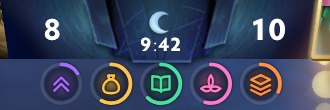
Timers倒计时
Mid rune, bounty, Wisdom Shrine, lotus and the stacking window, right below the game clock. A nearly-empty ring means it's nearly up. Turbo timings are picked automatically.
中路符、赏金、智慧神龛、莲花、堆野窗口,挂在计时牌正下方。 环快走完就是快刷了,不用读数字。快速模式自动识别。

Runes, buybacks, glyph, wards — what Dota 2 knows but never shows, on its own HUD 符、买活、塔防、眼位——游戏知道却不显示的,补到它的界面上
This is the real overlay, running the same code as the download, driven by a recorded match at real speed and looping. The background is a screenshot from the same match, with chat and notifications blurred. Game imagery © Valve. 这就是那个覆盖层本身,跑的和下载到的是同一份代码,由一份真实对局录制驱动、按原速循环播放; 背景是同一局的游戏截图,聊天和通知打了码。游戏画面 © Valve。
Mid rune, bounty, Wisdom Shrine, lotus and the stacking window, right below the game clock. A nearly-empty ring means it's nearly up. Turbo timings are picked automatically.
中路符、赏金、智慧神龛、莲花、堆野窗口,挂在计时牌正下方。 环快走完就是快刷了,不用读数字。快速模式自动识别。
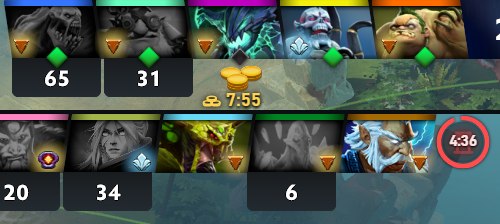
Buyback cooldown under every player's portrait, teammates included — the game shows it nowhere. Enemy glyph with the full refresh rules and the exact seconds left.
十个人的买活冷却挂在各自头像底下,队友的也有——游戏里哪儿都看不到。 敌方塔防实现了完整的刷新规则,冷却中写精确秒数。
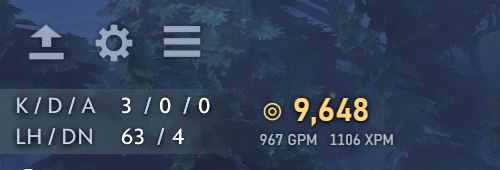
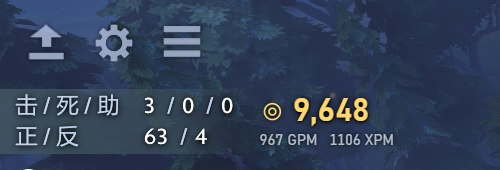
Net worth, GPM and XPM right next to the kill counter — items, stash, ward dispenser, courier and gold all counted.
净资产、GPM、XPM,就在击杀数旁边。装备、储藏处、眼架、信使在途、金钱都算进去。
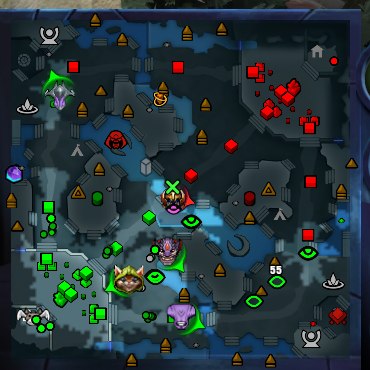
Enemy wards stay on Dota's own minimap after they leave vision, fading as the information ages. Dewarded wards get a cross; expiring ones a countdown.
敌方眼离开视野后照样留在 Dota 自己的小地图上,随线索变旧逐渐淡化。 我方眼被排了画个叉,快到期了标秒数。
Windows 10 / 11.
需要 Windows 10 / 11。
-gamestateintegration to Dota 2's launch options-gamestateintegration| Does not它不做 | read game memory · modify game files · inject into the process · hook graphics APIs · simulate input · phone home (the only requests are for updates: a check once on startup and when you press the button, a download when you press Update now) | 读游戏内存 · 修改游戏文件 · 注入进程 · hook 图形 API · 模拟任何输入 · 后台联网(只有更新会联网:启动时和点按钮时查一次版本,点「立即更新」才下载) |
| Does它做什么 | accept the data Dota 2 itself sends to 127.0.0.1 through
GSI,
Valve's official interface — the same mechanism Logitech and Razer drivers use ·
write the one GSI config file that turns it on · read Dota's own settings file to
find the minimap's side and size |
接收 Dota 2 自己通过
GSI
发到 127.0.0.1 的数据——Valve 官方的接口,罗技、雷蛇的驱动用的是同一套机制 ·
写一个打开 GSI 用的配置文件 · 只读 Dota 自己的设置文件,取小地图的位置和大小 |
During a match GSI only sends what you can already see, so by design it cannot reveal hidden information. Anything here you could see yourself by pressing Tab — it just remembers the timing. The source is open; go read it. GSI 在对局中只推送你自己能看到的数据,设计上就无法用于获取隐藏信息。 这里能算出来的,你自己按 Tab 一样能看到,只是它替你记住了时间。源码全部公开,可以自己核。